

I get asked what software we use more than any other question. People expect a product with a logo and a monthly fee. It's Python and a short list of free libraries, and every lesson in this series ran on them. The random twins from Monday, the drawdown distributions in #27, the sweeps in #24 and #25, the year-by-year optimizer picture in #32. Same toolbox every time.
Why Python and not the language your platform ships with? Because the platform's language runs the strategy. It can't run the experiment. Pine and NinjaScript place orders and draw lines. They do not build a control group, bootstrap a confidence interval, resample a drawdown a thousand times or deflate a Sharpe for the number of things you tried. So the strategy lives on the platform, the trade list and the bars get exported, and everything from the previous thirty-four lessons happens in Python. Two tools, two jobs. Python can do virtually anything and run on any system.
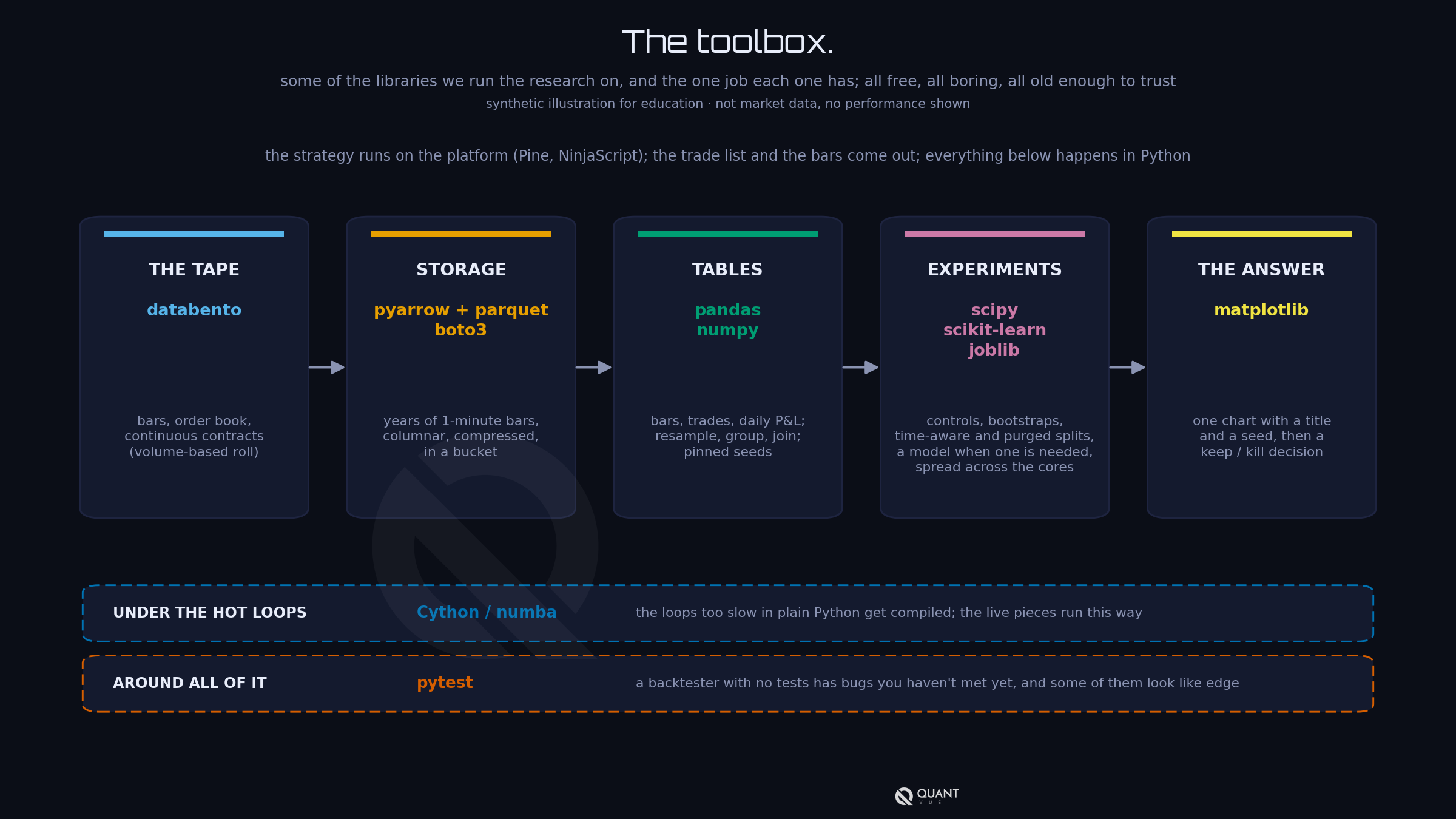
The list. Each one has one job.
pandas is the table. Every bar, every trade and every daily P&L row lives in a DataFrame. Resampling minutes into days, grouping trades by session, joining a trade to the bars it lived through, zero-filling the business days before the Sharpe in #26. If you learn one library, learn this one.
numpy is the arithmetic underneath. Arrays, vectorized math and the random number generator that draws the random entries and the Monte Carlo blocks. Every run pins its seed, so a result I got on Tuesday is the same result on Friday. A study you can't reproduce is a story.
scipy is the statistics shelf. Distributions, the tests, the confidence intervals, the fitting routines. It's the one place I allow the word optimize, because fitting a curve to a surface is a different thing from fitting a strategy to the past.
matplotlib draws every chart in this series. It is old and plain and it renders the same on a server with no screen attached, which is where the real runs happen. I have never needed anything prettier for a decision.
scikit-learn gives us the time-aware split, the pipeline scaffolding that fits a scaler on the training set only (#6), and a classifier when a question calls for one. Its general-purpose splitters don't know that time runs one way, so we reach for the time-series one and wrote our own purged versions, which is Friday's lesson.
We do use machine learning models, but for the sake of IP I'm not going to divulge which ones and which libraries specifically other than scikit-learn which has a ton in it. But that's not the only library I use for models.
pyarrow and the parquet format are storage. Years of one-minute bars sit in parquet, compressed, in columns, so loading one field for one year takes seconds. CSV is for handing someone a trade list. It is not for keeping data. If you haven't messed with parquets before and you're into this, then check them out. They're very efficient.
databento is the data client. The raw tape, the order book and the continuous contracts come in through it, with the volume-based roll so the series doesn't quietly change contracts on a calendar date. I also pull data from several other sources that I have subscriptions to. Sometimes they're easier/faster than DB.
What's missing from the list is as deliberate as what's on it. No indicator library. Write your own moving average, because you need to know exactly which bar it saw and when, and an off-the-shelf indicator that peeks one bar ahead will hand you a beautiful curve. Lots of people like pandas-ta, but trust me... write your own. You need to know precisely what it's doing.
Where to start if you have none of this. Install pandas, numpy, scipy, matplotlib and scikit-learn. Export a trade list from your platform. Your first script reads it, builds the daily P&L with the flat days filled in, prints the Sharpe and the maximum drawdown. That's about fifty lines and you'll learn more from writing it than from any report your platform prints. Even if you're leveraging a lot of AI it will benefit you greatly to learn how to code these things.
The one rule for choosing between libraries. The library is never the edge. Pick the boring one with the most users and the longest history, because the edge is in the data you collect and the questions you ask of it, and the tool only has to not get in the way.
Friday, CPCV.
This lesson was originally sent to the Algo Creator School email list on October 14, 2026. New lessons go out by email regularly. Join the list at quantvue.io.
Educational content only, not financial advice. Futures trading involves substantial risk of loss and is not suitable for all investors. Individual results vary, and past performance, actual or simulated, does not guarantee future results.


After check out, you will receive a Welcome Email with your login details.
Use these details to Login to our dashboard, where you'll then submit your TradingView or NinjaTrader information.
Access is granted automatically if the form is filled out properly.
If you are having issues with access being granted, please submit a support ticket here.
No. Our core system is designed for those with baseline trading knowledge and live-trading experience. Do not sign up if you're a beginner trader. Intermediate to advanced experience is recommended.
No. There is no algorithm or indicator that can accurately predict with 100% certainty the financial markets.
QuantVue is not responsible for trading losses. Past results are never indicative of future performance. Use QuantVue and trade at your own risk.
Our tools are designed for futures. However, clients can tweak our toolkit to any chart or market.
Most clients use a paid TradingView plan, and the most popular among users is TradingView premium.
You can manage your account in the "My Account" tab or submit a support ticket here and we will process your cancellation immediately!
Our monthly & yearly Pro / Elite plans are backed by a 30-day money back guarantee. If you are not 100% satisfied within 30 days from the time of purchase, you may request a full refund.
Beyond the 30-day period, all sales are final.
The 30 day money back guarantee only applies to first time customers. If you have used our system or had a plan in the past, you are not eligble for a refund. This means if you have used the PRO plan in the past and sign up for ELITE at a later date, you will not be elgible for the refund guarantee and vice versa.
This refund policy does not apply to our ATS program.
See our full refund policy here.
There is a separate money back guarantee for the ATS Program. The ATS refund policy has certain conditions that must be met to receive a full refund.
See our full ATS refund policy here.
The Elite Plan on it's own does not automate into cash or prop firm accounts.
If you want to automate our tools into cash or prop accounts, you can do so via our alert connector QuantLynk here.
Keep in mind QuantLynk is detectable by prop firms, so we recommend using an automation-friendly prop firm.
To automate our tools into prop account undetected, we recommend our ATS Program here.
No. There is no free trial on the ATS program.